

Call for Help · add-on for the Operator app
Andon software that gets help to a stopped machine in one tap
When a machine needs a mechanic, the shift lead or a fresh roll of film, the operator taps Call for Help on the screen that's already at the machine. The right person gets a phone notification, SMS or email straight away. Nobody reaches for a walkie-talkie, shouts down the line or leaves a stopped machine to go and find help.
- One tap at the machine
- A phone alert to the right person
- €13 per machine per month
Call for Help isn't switched on for your account yet
Get help to a stopped machine in one tap
Your operators already use the Operator app at the machine. Call for Help adds one button to it: the operator taps the call that fits, and the mechanic, the shift lead or the material handler gets a phone notification, SMS or email straight away. It needs no new hardware and no setup project.
€13 per machine per month, added to your current plan.

What is andon software?
Andon software replaces the andon cord or light tower with a digital call. The operator flags a problem from a screen at the machine, and instead of a lamp someone has to notice, the message goes straight to the person who can fix it. GlobalReader's andon software is Call for Help: one tap in the Operator app, then a phone notification, SMS or email to the mechanic or shift lead.
A digital andon system usually has three parts: a way to call for help, a way to see every machine's status, and an alert when something has been stopped too long. In GlobalReader those are Call for Help, Smart LiveView and notifications.
GlobalReader is a modular MES for small and mid-sized manufacturers, and Call for Help is its andon add-on for the Operator app. It calls people to a machine. It does not stop the machine, so it does not replace an emergency stop or a safety alarm.
How a call gets to the right person
The operator taps
On the Operator tablet at the machine, the call that fits: need a mechanic, need the shift lead, need material.
The right person gets it
A phone notification, SMS or email lands in their pocket or inbox. Nobody has to catch it on the radio.
Help comes to the machine
The operator stays with the line, and the responder knows which machine needs them before they get there.
Every stop is two stops: the fault, and the wait for help
Here is one 40-minute stop on Edge bander 2 at an example factory. Fixing the fault takes the same 12 minutes both times. What changes is everything before it.
Before: walkie-talkie and walking the floor
- Until someone notices · 3 min
- Waiting for help · 25 min
- Fixing the fault · 12 min
With Call for Help
- One tap · 1 min
- Help on the way · 6 min
- Fixing the fault · 12 min
- Back to production · 21 min
Make the wait visible in your reports
The fault goes into the downtime report. The wait hides inside it. Set up a stop reason called "waiting for maintenance", and the operator marks it while help is on the way. The wait then shows in your stop reports as its own loss, per machine and per shift.
That is when you can see how much of your downtime is people looking for each other, and which machines and shifts it hits hardest.
Example
- 1 hour a day10 minutes of waiting, 3 times a shift, on 2 shifts
- ≈ €2,100 a monthfor one machine at €100 an hour of machine time
- €13 a monthCall for Help for that machine
A call for each problem, a person for each call
Each call goes to the people who handle it, so a stopped machine reaches maintenance and an empty roll reaches the material handler. The operator picks the call, adds a few words if it helps, and gets back to the line.
You decide who receives each call when Call for Help is set up. "Material" means what the station runs on and runs out of: film, labels, screws, glue.
- Need a mechanicgoes to Maintenance
For example: Press line 2 has stopped and sounds wrong.
- Need the shift leadgoes to The shift lead
For example: Edge bander 2 needs a decision on the order before it carries on.
- Need materialgoes to The material handler
For example: Packing line 1 is on its last roll of film.
Virtual andon
Status on the wall, a call in a pocket, an alarm when it's too long
A light tower does three jobs at once: it shows status, it calls for help, and it raises the alarm. In GlobalReader three parts do those jobs, on screens and phones you already have.
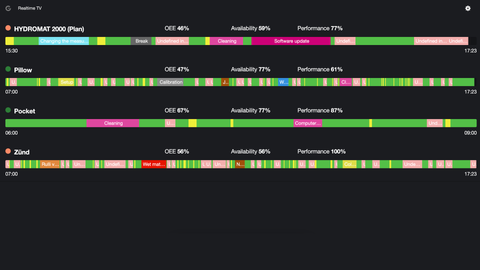
The andon board without the board
Smart LiveView
Every machine's status on any factory TV: green when it runs, red when it stops, with the reason next to it.
See Smart LiveView
The andon cord without the cord
Call for Help
The operator's one-tap call to maintenance, the shift lead or the material handler, by phone notification, SMS or email.
The alarm nobody has to raise
Notifications
When a machine has been stopped longer than a limit you set, an alert goes out by app, SMS or email: to the operator after 5 minutes, say, and the production manager after 30.
Live status screens, operator calls for help and alerts work together as a virtual andon. Start with the call; add the screens and the alerts when you want them.
Andon lights or a call to the right phone?
A light tower tells whoever can see it that something is wrong. A call reaches a named person on their phone, even at the other end of the hall or in the office, and says which machine needs them. Many factories keep lights or screens for status and add a direct call for the help itself.
| Call for Help | Andon light tower | Walkie-talkie or shouting | |
|---|---|---|---|
| Who hears it | The person responsible, on their phone | Whoever happens to see the light | Whoever is listening |
| When the responder is off the line | Still reached, in a pocket or an inbox | Not reached: line of sight only | Sometimes |
| Says which machine needs help | Yes, in the message | Only by where the light is | If someone says it |
| The operator stays at the machine | Yes, one tap | Yes, but someone has to notice | Often not |
| Hardware at each station | None, it uses the Operator screen | A tower, wiring and installation | A radio per person |
| On older machines | Works the same: the operator raises it | Wiring per machine | Works |
| Cost | €13 per machine per month | Hardware and installation per station | Cheap, and unreliable |
Light towers still make sense where status has to be seen across the hall. Pair them, or a Smart LiveView screen, with a direct call.
Help, not blame
What changes on the floor
Operators
Help comes to you
No leaving the machine and no fighting for the radio. Mark the stop as waiting for maintenance, and a long stop reads as waiting for help, not as your fault.
Shift leads
The same call on every shift
The same one-tap call on the day shift and the night shift, and it always reaches the person responsible.
Maintenance
Called to the right machine
A direct message naming the machine, instead of a shout across the hall or a search on foot.
Owners
Capacity back, for €13 a machine
Every minute cut from waiting is production time you already pay for: machines, people and the shift itself.
Fewer people walk the floor looking for each other, and more machines keep running.
No towers, no wiring, no new app to learn
Call for Help is a button in the Operator app your operators already use to log stops and amounts, on a tablet or a browser at the machine. Because the operator raises the call, it works on any machine: a new CNC, a 30-year-old press, a manual packing table.
Switching it on is a setting on your account. There's no project to run.
- Runs in the Operator app at the machine
- Any machine, any age, any brand
- Operator screens in English, Estonian, Finnish, Latvian, Polish, German, Russian and Romanian
- Servers in Europe, on-premise on request
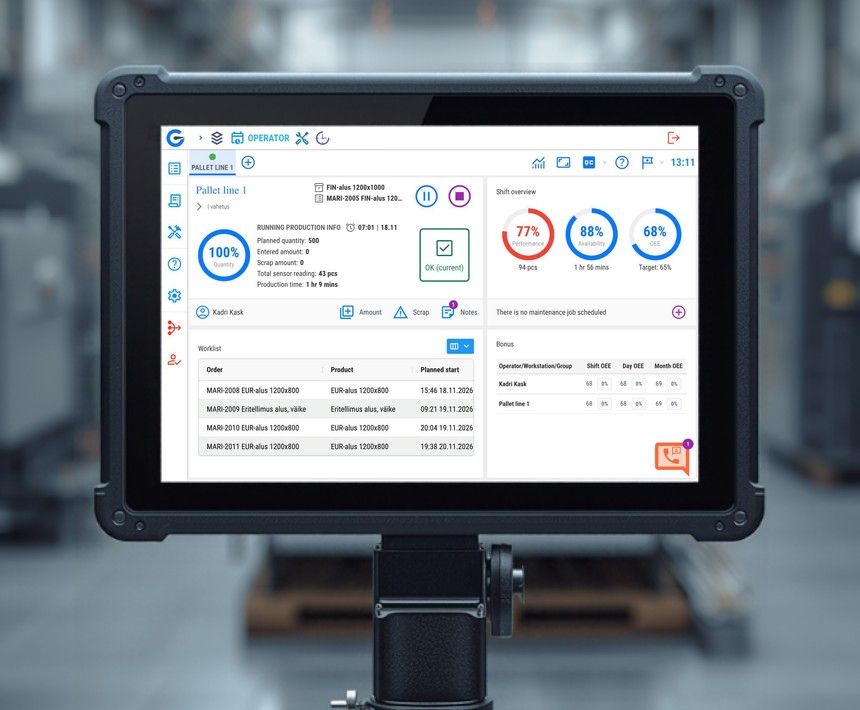
€13 per machine per month: less than ten minutes of a stopped machine
Call for Help is an add-on to the GlobalReader Monitoring Core. The price does not change with the number of calls, responders or users, and there are no tiers.
€13
per machine per month
Added to the Monitoring Core: €125 per machine per month, with the Scoutbox, sensors, Analytics, notifications and support included.
Pay yearly in full and save 5%.
Book a demoRuns in the Operator app on the screen at the machine.
What you get
- One-tap calls from the Operator app at the machine
- Phone notification, SMS or email to the person responsible
- Calls for maintenance, the shift lead and material
- Works on any machine, of any age or brand
- No towers, wiring or radios at the station
- Pairs with Smart LiveView and notifications as a virtual andon
At €100 or more an hour of machine time, cutting the wait for help by ten minutes once a day pays for the add-on many times over.
Calculate your factory savings- +27.4%
- Average OEE improvement
- +22.8%
- Availability improvement
- €39,200
- Recovered per machine per year
- 200+
- Factories monitored across Europe
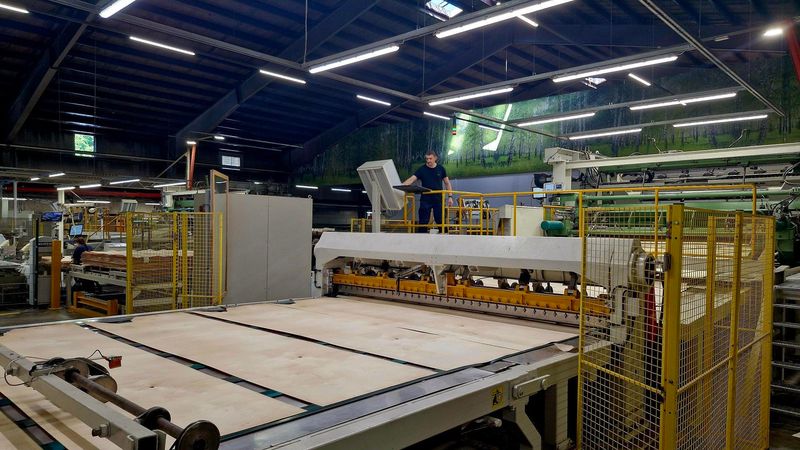
How GlobalReader customers use Call for Help
From walkie-talkies to one tap on a veneer line
At Balti Spoon, a maker of decorative veneer, downtime used to live on paper and help was summoned by walkie-talkie. Today 29 of its 40 lines are connected to GlobalReader, in a plant that runs up to three shifts. Call for Help is one of the modules the floor uses every day, next to Operator and Analytics.
"The operators are very diligent in logging comments that I can then direct straight to the production side or the technical side."
Factories running GlobalReader



Call for Help questions
The questions production managers, shift leads and maintenance ask us most. Something missing? Ask us directly.
What is andon software?
Andon software replaces the andon cord or light tower with a digital call. The operator flags a problem from a screen at the machine, and the message goes straight to the person who can fix it instead of to a lamp someone has to notice. GlobalReader's andon software is Call for Help: one tap in the Operator app, then a phone notification, SMS or email to the mechanic or shift lead.
How is a digital andon different from andon lights?
An andon light tells whoever can see it that something is wrong. A digital call reaches a named person on their phone, even at the other end of the hall or in the office, and says which machine needs help and why. Many factories keep lights or screens for status and add a direct call for the help itself.
Who receives the call?
The people responsible for that kind of call: maintenance for a machine problem, the shift lead for a decision, the material handler for a station that is running out. You decide who they are when Call for Help is set up, so each call reaches a named person.
Can we set up different calls for maintenance and the shift lead?
Yes. Each call goes to its own people, so a jammed machine reaches maintenance and a question about the order reaches the shift lead. The operator picks the call that fits and can add a few words.
Does the call come by SMS, email or an app?
Any of the three, set per call type: a notification in the GlobalReader phone app, an SMS or an email. The notification shows the call and the machine, with the operator's message underneath. SMS and email need nothing installed, so they reach any phone, wherever the responder is on the floor or in the office.
Do we need light towers, wiring or new hardware?
No. Call for Help runs in the Operator app on the tablet or screen that is already at the machine. There are no towers to mount, no cables to run and no radios to hand out.
Does it work on older machines?
Yes. The operator raises the call, so the machine's age, brand or controller does not matter. It works the same on a new CNC, a 30-year-old press and a manual packing table.
What if a machine stops and nobody calls?
Notifications cover that. When a machine has been stopped longer than a limit you set, an alert goes out by app, SMS or email, and it can escalate from the operator to a manager. With Call for Help as well, a stopped machine no longer waits for someone to notice it.
Can we see how much time we lose waiting for help?
Yes, once you add a stop reason such as "waiting for maintenance". The operator marks it while help is on the way, so the wait shows in your stop reports as its own loss, per machine and per shift, instead of hiding inside the fault.
Will operators actually use it?
It is one tap, and it works in their favour. Help comes to them, they do not have to leave the machine or fight for the radio, and a long stop is recorded as waiting for help, so it is not put down to them.
Is Call for Help a complete andon system?
On its own it is the operator's call for help. Together with Smart LiveView, which shows every machine's status on a factory TV, and notifications for machines stopped too long, it works as GlobalReader's virtual andon.
Which languages does the operator see?
The Operator app runs in English, Estonian, Finnish, Latvian, Russian, German, Polish and Romanian, set per person.
How much does Call for Help cost?
€13 per machine per month, added to the GlobalReader Monitoring Core (from €125 per machine per month, with the Scoutbox, sensors, Analytics, notifications and support included). There are no tiers and no per-user fees.
Is Call for Help real-time alert software?
Yes. A call goes out the moment the operator taps it, and machine-stop notifications go out the moment a stop passes the limit you set, both by phone notification, SMS or email. It needs no extra hardware and works on any machine.
Give every operator a one-tap way to get help
See Call for Help in a 20-minute demo built around your own machines.
90 minutes of setup per machine · Works with any machine · Hardware included in the subscription